I want to roll one red d10, one blue d10, and one green d10 at the same time. Is there a way to do this? The color of the dice are needed for the rules of my game. I’m using Realm VTT Basic (if that helps).
Hi there!
There is actually a way to designate dice color via the Ruleset API.
It is done by setting “diceColors” in the metadata of a roll and assigning a color by type. Here is an example of how I am doing it an upcoming Ruleset implementation, where a die type of “expertise” has a specific color:
const modifiers = [];
const EXPERTISE_DICE_COLORS2 = {
  "expertise": { "diceColor": "#ff0000", "textColor": "#ffbb00" }
};

const metadata = {
  "diceColors": EXPERTISE_DICE_COLORS2
};

const diceRoll = "1d20 default + 1d4 expertise";

api.promptRoll("Attack", diceRoll, modifiers, metadata, "attack");
(Edit: Fixed macro typos.)
I should also mention, if you’re doing this in Realm VTT Basic (and not the Ruleset Editor) you’ll want to do it in a custom Macro (and then add the macro either to the chat, hot bar, or in a rich text field of a character sheet.)
If you need custom handling for the rolls or custom roll types — such as logic/code that runs when rolling for an attack, or some other type of roll, you’d have to build that out in a custom ruleset.
Is there a way to do this in a macro, without having the Attack box open up? i.e. have it just roll the three different colored d10? I don’t need it attached to any Attribute, Skill, etc roll.
Also, is there a way to have the blue d10 “explode”? (roll over if the result is a 10, and keep adding to the blue total, as long as a 10 keeps getting rolled). I don’t want the red or green to “explode”
Sorry, I’m not great at writing code.
No worries!
You can certainly have it roll without the prompt using something like this, to do d10s:
const modifiers = [];
const DICE_COLORS = {
  "red": { "diceColor": "#ff0000", "textColor": "#ffffff" },
  "blue": { "diceColor": "#0000ff", "textColor": "#ffffff" },

};

const metadata = {
  "diceColors":DICE_COLORS
};

const diceRoll = "1d10 red + 1d10 blue";

api.roll(diceRoll, metadata, "chat")
Exploding dice rolls are currently only possible in the Ruleset API using the roll handlers, though, so that’s a bit more complicated! We can look into adding it as a macro feature as well in the future though.
Thank you so much! I’m really enjoying what I’m seeing with Realm VTT so far!
No problem! Glad to hear it 
We now have an easier way to do exploding dice (and recoloring of dice) in macros or in the /roll command!
This command will get you I think what you’re looking for in the chat:
/roll 1d10![#0000ff]+1d10[#ff0000]+1d10[#00ff00]
And a very simple way to do it from a macro:
api.roll("1d10![#0000ff]+1d10[#ff0000]+1d10[#00ff00]");
Swap the hex codes for whatever shades you like — [#bg] with 1 hex code works if you want to just change the die color and keep use configured font color and [#bg,#text] with two hex codes also works if you want to set the number color separately from the die color.
Also, we finally updated our API docs here:
So cool! This is perfect, and exactly what I was looking for. Thank you for all your work!
1 Like
Is there a way to have that exploding die (the blue one) tied to an Ability (and the associated Attribute) of a character AND have the other two dice roll as well (but not have anything added to them)?
For example: The player clicks the button to roll his Acrobatics skill, and all three dice (blue, red, and green) roll. The blue die is what determines if the skill succeeds or fails. The red and green dice do not have anything added to them ever.
I tried putting: api.roll(“1d10!![#0000ff]”); api.roll(“1d10[#ff0000]+1d10[#00ff00]”); in the “Roll” box for the action, but the skill level and attribute level are added to the total instead of just the blue die.
Hi! I think what you’re suggesting is possible with a macro.
If you can give me a screenshot of how you have your attributes configured, I can replicate it on my end and try to write one for one!
Great! I hope this is what you’re looking for: (On the Main tab of the character, I have the attributes)
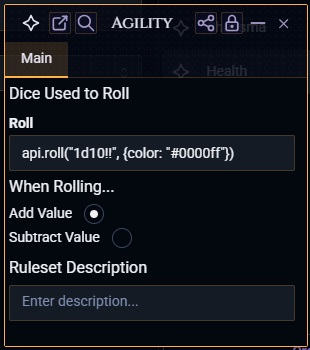
Oh I see!
Try this in the “Roll” field and let me know if that works: 1d10!![#0000ff]
Yes, this works exactly as it should. In my game system, the player rolls 3 dice at once (blue is the success/fail die, red determines how much effort was used, and green is the benefit/problem die). Only the blue die explodes and adds anything to it (such as the attribute and skill level). Red and green are just a simple d10 roll with no modifiers added.
I’d like to have the player click their Shooting skill and have all three dice rolled. I can do it with the method I showed earlier but that rolls all three dice and adds the Attribute and Skill level to the total. I would hope to see it only added to the blue die and not the total.
I hope that all makes sense, and I really appreciate your help!
No problem! Ah, I see. So basically the other colored dice should be reported to the chat, but not totaled up.
I’ve just made a change to the Abilities. Give it a refresh and try the following and let me know if that works!
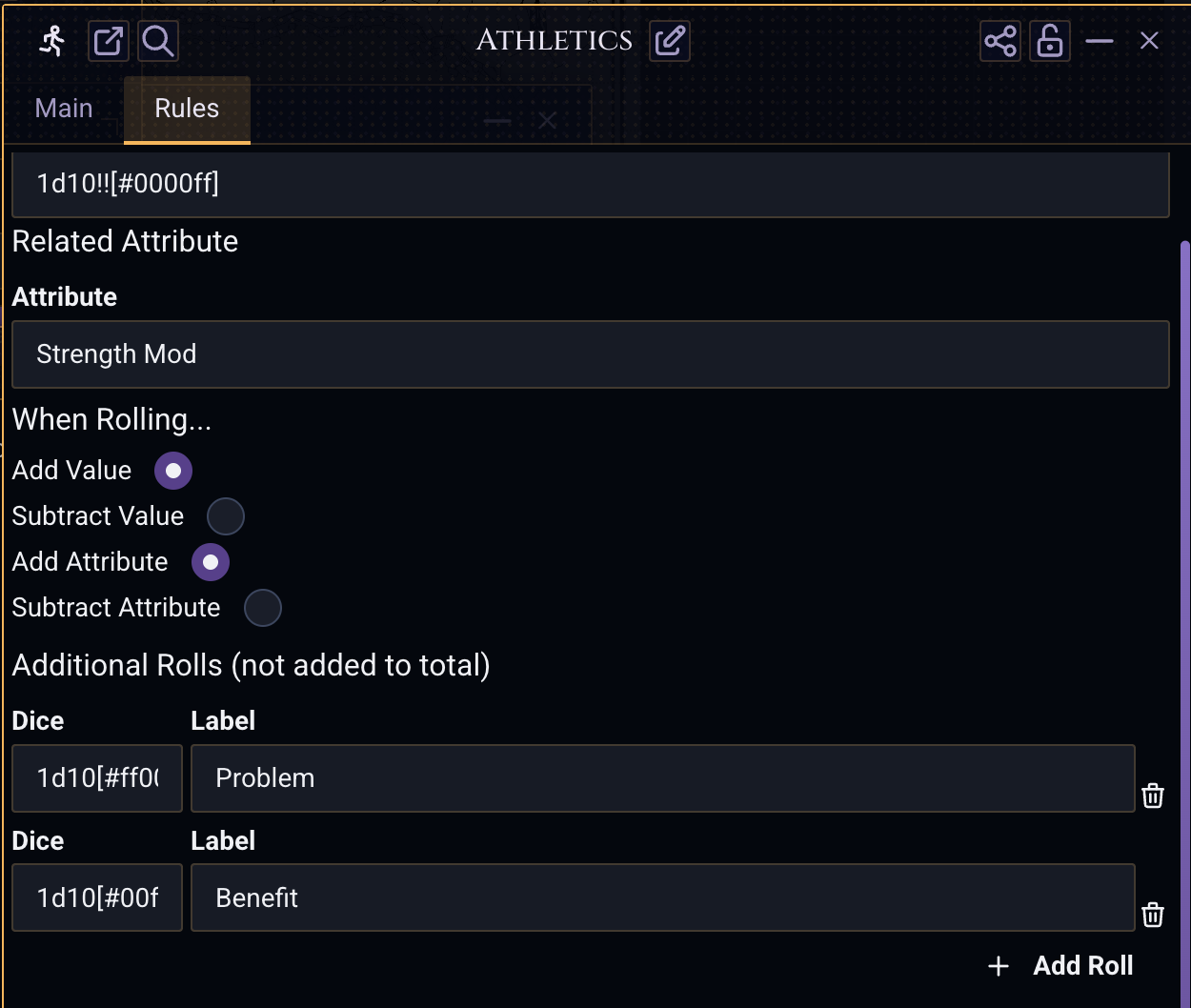
You’ll want to set the rolls to something like
1d10[#ff0000]
1d10[#00ff00]
Then the roll looks like this in the chat.
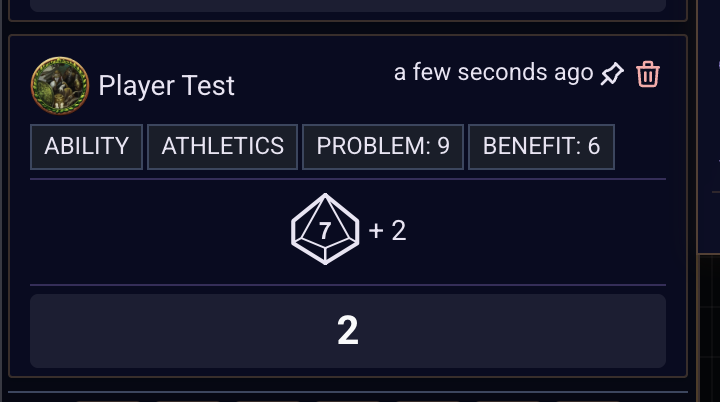
Well, I see a bug in my changes there actually, but I’ll let you know when it’s fixed up!
Ok! I think it’s working better now, I stil need to fix an edge case for when it explodes but the total should report right. Let me know!
That works very well! Is there a way I can have the added dice be specific colors (red and green)?
Edit: Nevermind, I figured it out.
Thank you very much Sean, you’re such a huge help!
No problem! Glad it’s working 