Is there any way to add an image file to the NPC characters that are loaded with the rules rather than using the default first letter? I’m just hoping to make it easier for everyone to quickly see which tokens are which at a glance rather than having to physically select them.
Hi there, yes!
If you just want to edit the images within the campaign, you can:
- Find the NPC you want to add an image to, click to open it
- Click the Lock button in the top right to unlock it
- Click the portrait icon in the top left to open the portrait tool
- Upload a portrait and create a token from that in the token tool on the right (or just upload a custom token if you have one you want to use.)
However, it is preferable to make your own module so you can re-use it across campaigns! If you want to make your own module that you can reuse in other campaigns containing the images I suggest you do this:
- Make a new campaign to create the module with
- Import the SRD Monsters Module
- Right click the monster you want to export with an image and click “Copy”
- On the copy - click the portrait area in the top left when the record is unlocked
- Then add the portrait and use the token tool to create a token for it
- Then you can go ahead and rename the NPC to remove the “Copy” verbiage
Once you’re ready to export the module go to:
- Modules
- Click Export Module
- Give it any name you like
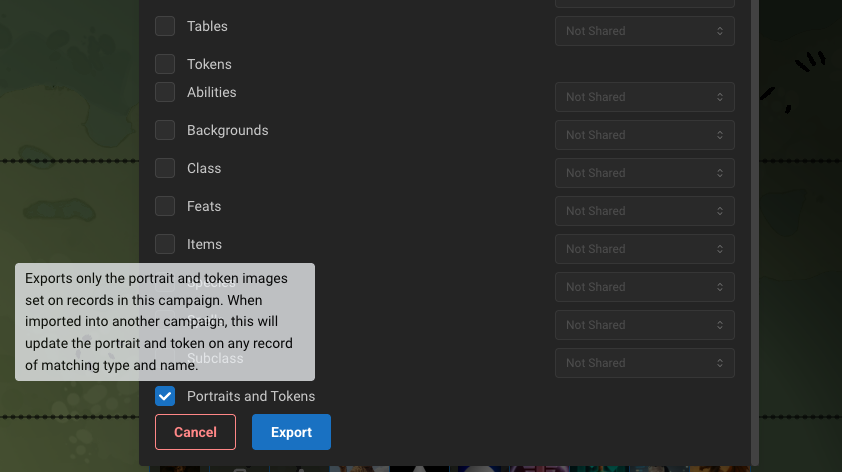
- Scroll down to the bottom and select “Portraits and Tokens” - this will export just the artwork you set on NPCs and Records that you copied or created (which is why we want to copy the NPC first)
- Click export
- Now you can go to any of your other campaigns and first import the SRD Monsters module then Import your Artwork module, and it will set all the tokens and portraits on those NPCs and Records!
Let me know if you have any questions!
Edit: Updating the instructions a bit, since we just pushed a new feature to export just the artwork rather than the whole NPC (which is a lot faster for export/import.) And note about alternative method.
Awesome! Thanks for the input, I seem to have it working now. Two follow ups related to this.
- Since this is official D&D source material if I add a few of the missing Monsters/NPCs from the Monster Manual with tokens will I be violating their terms of use? I won’t be selling these in a marketplace.
- Once exported, will those tokens count against my account storage?
Thanks again, appreciate your help!
Hi again -
No, you can safely add the missing content to your own module! Since the modules you export would only be accessible to you (and your table via the campaign) this is all ok to do. (But good question!)
If you’ve set images on only one record, and export the module, it only counts those towards your storage 1 time. (Even if you import those tokens into another campaign!)
For example, if you copy each of the 330 monsters and add a token on each, it’d count all 330 images and tokens towards your asset storage use. But importing those NPCs or tokens in another campaign will not double count them.
Hope that helps!